Running a standard LAMP or WordPress stack on a virtual private server means maintaining an entire operating system for a workload that spends most of its life waiting for requests.
A typical $5 to $10 per month droplet on Hetzner or DigitalOcean runs Linux, Nginx, PHP-FPM, and MariaDB. For small to medium content sites, the server CPU sits idle between visits. Despite that low utilization, you are still responsible for keeping the host running: applying OS security updates, tuning MySQL memory limits so the OOM killer doesn't drop the process, rotating web server logs, renewing SSL certificates, and blocking brute-force attempts on /wp-login.php.
Modern edge infrastructure replaces long-running server daemons with lightweight serverless primitives. On Cloudflare, you can host a complete database-backed content architecture using native services that scale to millions of requests without maintaining a single virtual machine—and for typical content workloads, the infrastructure costs effectively nothing.
Edge hosting replaces traditional server stacks with four native Cloudflare primitives:
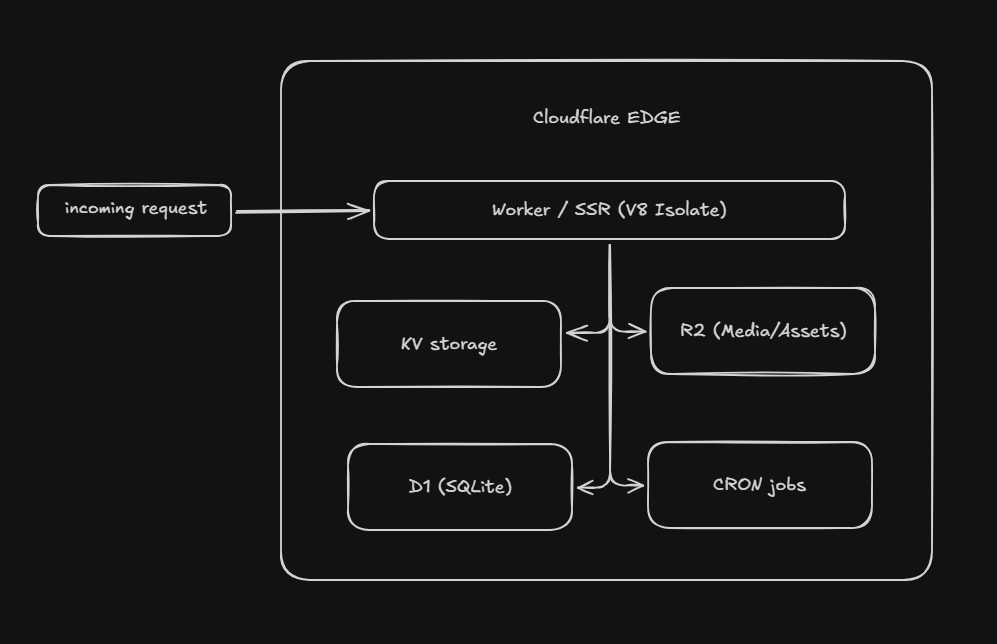
1. Compute: Workers (V8 Isolates)
Traditional serverless runtimes (like early AWS Lambda) incurred 200–800ms cold starts while provisioning container instances. Cloudflare Workers execute inside V8 isolates. Startup latency is typically under 5 milliseconds.
There is no idle process. If no traffic arrives, no compute runs. When traffic spikes, isolates execute across hundreds of edge data centers simultaneously without load balancer configuration.
2. Database: D1 (Serverless SQLite at the Edge)
Connecting a serverless function to a centralized MySQL or PostgreSQL instance usually requires managing connection poolers like PgBouncer and accepting 50–150ms of network round-trip latency.
D1 runs SQLite natively on edge infrastructure. Because SQLite is embedded and file-based, read queries execute with microsecond latency close to the visitor, with automatic read replication across global regions. You query standard SQL without persistent socket overhead.
3. Media Storage: R2 (Zero Egress Fees)
Cloud storage costs are notoriously driven by bandwidth egress. Traditional providers frequently charge $0.09 per gigabyte just to transfer images to visitors.
Cloudflare R2 provides an S3-compatible API with zero egress fees. Storage is billed strictly for data at rest and operation counts. For content sites hosting gigabytes of screenshots and media, outbound data transfer drops to $0.00.
Cloudflare’s standard tier provides substantial monthly allocations before billing begins:
| Primitive | Free Monthly Allowance | Typical Workload Capacity |
|---|---|---|
| Workers | 100,000 requests / day | ~3,000,000 requests per month |
| D1 Database | 5,000,000 rows read / day 100,000 rows written / day | High read throughput for content caching |
| R2 Storage | 10 GB stored 1M write ops, 10M read ops / month | Full media library with zero egress fees |
| Global CDN | Unlimited bandwidth | Automatic DDoS protection and anycast routing |
For blogs, documentation portals, and marketing sites that receive under 100,000 daily requests, total hosting costs remain $0.00 per month.
If traffic grows beyond those limits, the $5/month Workers Paid plan includes 10 million requests, 25 billion D1 row reads, and 50GB of R2 storage. A $6/month single-core VPS would require complex caching layers or an upgrade to survive that same traffic volume.
The benefits of edge hosting have been clear for years, but adoption stalled because early solutions relied on pure Git-based Static Site Generators (SSGs).
Requiring non-technical contributors to clone a git repository, write Markdown in a code editor, open pull requests, and wait for CI/CD deployment runs to fix a typo is impractical for real teams. Publishing requires a web dashboard, draft previews, revision histories, and integrated media uploads.
Headless edge CMS platforms—such as EmDash—resolve this by deploying the CMS application itself directly onto edge primitives:
- The CMS application runs as a Cloudflare Worker.
- Schema, articles, taxonomies, and revisions live inside D1.
- Uploaded images stream directly to R2.
- The frontend (such as Astro or a client framework) queries D1 or edge APIs during SSR or at build time.
Editors keep the publishing workflow of a traditional CMS, while the site retains the performance and reliability of edge hosting.
You don't need custom scrapers or DIY database scripts. EmDash provides an official WordPress migration pipeline built into the admin dashboard (/_emdash/admin/import/wordpress) and CLI.
1. Ingesting the Entire Site
EmDash supports two migration paths depending on how your existing site is set up:
- The EmDash Exporter Plugin (Full-Site Sync): Installing the companion exporter plugin on your WordPress host opens a restricted endpoint protected by a WordPress Application Password. EmDash connects directly to pull your entire site: published posts, pages, drafts, revision history, navigation menus, comments, site logo, favicon, and taxonomies.
- WXR XML Upload (Static Transfer): If you can’t install plugins, generate a standard export (
Tools > Export) in WordPress and upload the.xmlfile. EmDash parses the file, maps post types and taxonomies, and prompts you to map legacy authors to EmDash users.
2. Automatic Gutenberg-to-Portable-Text Conversion
WordPress stores rich text as serialized HTML peppered with Gutenberg comment delimiters (<!-- wp:paragraph -->). EmDash automatically runs internal AST transformers (@emdash-cms/gutenberg-to-portable-text) during ingestion, converting WordPress blocks into structured Portable Text without manual regex cleanup.
3. Automated Media Streaming to R2
During import, EmDash identifies all attached media, downloads them from your existing host, streams them directly into your configured Cloudflare R2 bucket, and rewrites asset URLs across your content to match your edge media domain.
4. What You Actually Need to Rebuild (The Presentation Layer)
PHP themes and page builders (Elementor, Divi) don't transfer to edge runtimes. The migration effort focuses almost entirely on the frontend:
- Templates: Replaced with clean Astro components and routes that query D1 or the EmDash content API.
- Plugins: Most WordPress plugins become redundant on this stack—caching, sitemaps, RSS feeds, and SEO metadata are handled natively by Astro and EmDash's schema. Custom dynamic workflows run as lightweight TypeScript edge functions or sandboxed EmDash plugins.
- 301 Redirects: Setting up permalink rewrite rules ensures old WordPress URL structures (
/%year%/%monthnum%/%postname%/) preserve their search rankings.
While edge hosting works well for content workloads, there are architectural constraints to consider:
- D1 Write Concurrency: D1 is based on SQLite. Read performance scales globally through read replication, but write operations are serialized through a single coordinator. It is well-suited for CMS publishing, but not for applications requiring thousands of concurrent transactional writes per second.
- No Dynamic PHP Extensions: You cannot install monolithic plugins that execute arbitrary PHP on the server. Capabilities like search, forms, or analytics are integrated via lightweight edge APIs or external services.
- Execution Limits: Worker execution on free tiers enforces a 10ms CPU limit per request (excluding asynchronous network I/O). Application rendering logic must remain lean.
For content sites, running an always-on virtual machine in 2026 is unnecessary operational overhead. By combining Workers, D1, and R2, you get sub-50ms global latency, zero server maintenance, and an infrastructure bill that stays at zero dollars for almost all small to medium websites.